
Tell someone to "go bowling" and you've handed them a stack of decisions before the first ball. Which alley? Is a lane open? How many games can they afford? By the time they're lacing up rented shoes, a good part of the evening has gone to logistics.
Agents get told to go bowling all the time. "Build the integration." "Add sharing to the app." The agent has to pick tools, guess where the data lives, decide how much to try before reporting back, and invent an architecture for whatever the request left open. Some of those guesses land. The rest come back to you as review work.
Now suppose you own the alley. You've chosen the lane, the pins are set, and another game costs nothing. The bowler can throw, see which pins are still standing, adjust, and throw again without asking anyone for a tenth frame.
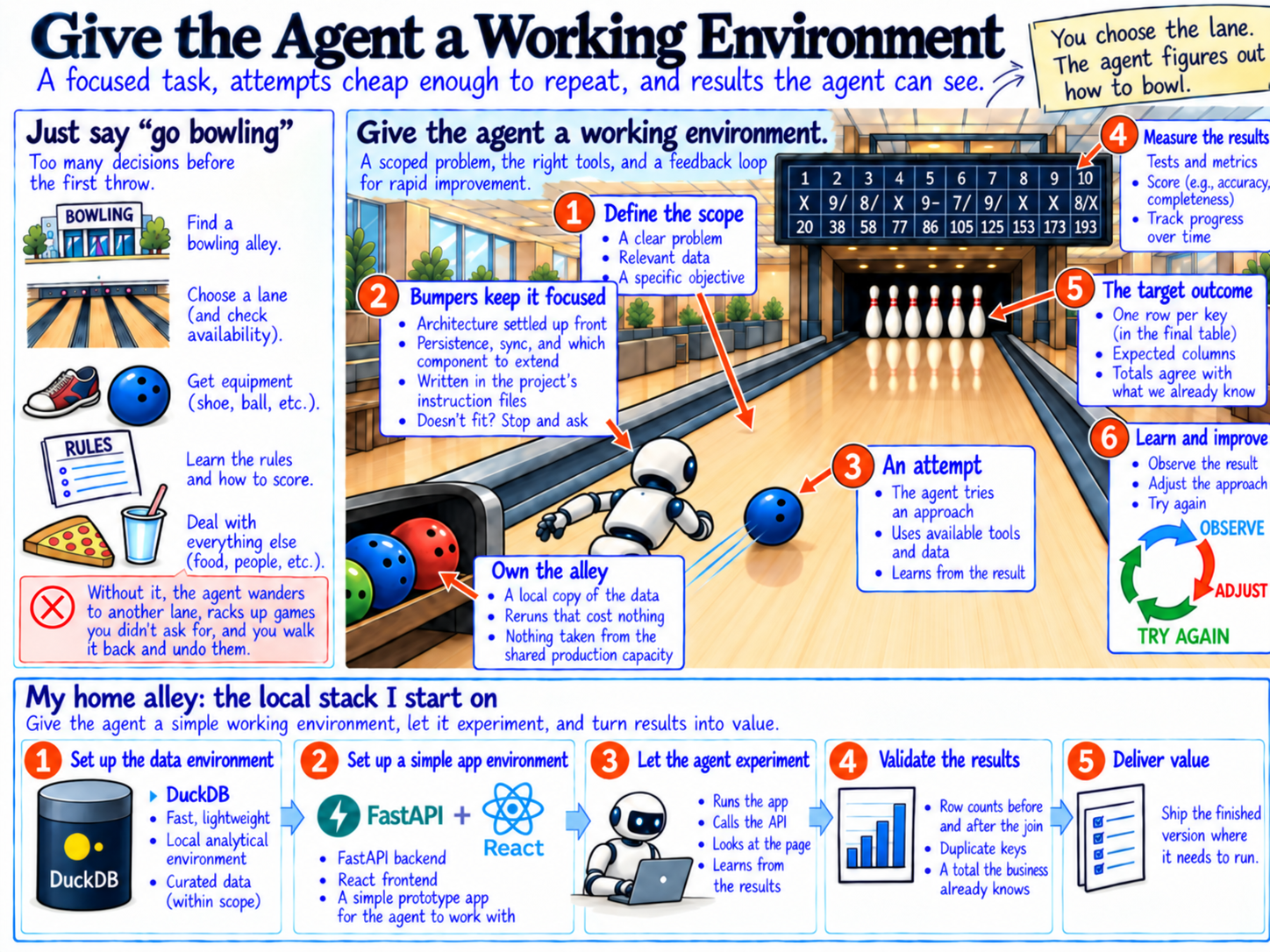
That's the environment I try to prepare before handing an agent real work: a focused task, attempts cheap enough to repeat, and results the agent can see for itself. With those in place, an agent can carry work much further on its own. Without them, the agent wanders into another alley, bowls on a lane I never picked, and runs up a tab of games I never asked for. Then I'm the one bringing it back, rechecking every frame, and undoing the ones that don't count.
Owning the alley changes how much you practice
When you pay per game, you ration games. Each one has to count, so you stop trying things.
I ran into this on an integration project. Data from a new external system needed to join to ServiceNow tickets and arrive in a shape Power BI could report on. Before any of that, someone had to understand the new data: which fields were actually populated, which identifiers could be trusted, how records related to each other, and what a single row represented.
That understanding comes from a lot of small questions. How many distinct values are in this column? Which records have no match? Does this ID repeat? What happens to the row count if I join on this field instead of that one? An agent asks those questions quickly, dozens in a few minutes, and most of them are throwaway.
This data lived in Microsoft Fabric, and in Fabric every one of those questions draws on the capacity. A capacity is a fixed pool of compute shared by the workspaces assigned to it. The agent's throwaway queries pull from the same pool as the scheduled refreshes, pipelines, and Power BI reports people rely on every day. When usage runs past what the capacity can absorb, Fabric throttles it, first slowing interactive requests and eventually rejecting them.
That's like practicing on the lanes during league night. An afternoon of experimentation can slow the reports other people are opening at the same time, all for queries nobody will run again. Once you know that, you start rationing: asking the agent for fewer, bigger queries and reviewing them before they run. Understanding a new dataset needs the opposite.
So I pulled extracts down and gave the agent DuckDB on my laptop. DuckDB is an analytical database that runs inside the process using it. It reads Parquet and CSV files directly and handles millions of rows comfortably on ordinary hardware. The ceiling is much higher than that: the DuckDB team ran the full TPC-H benchmark against roughly 3 TB of CSV data on a Framework laptop, and all 22 queries finished in under an hour, on battery power. A query costs a moment of local compute. The agent can profile every column, try three join strategies, and discard two of them without taking anything from production.
That setup has become my home alley for any new integration. When a new vendor or API needs to land in our Fabric environment, I start on my laptop. A small FastAPI service pulls the data straight into DuckDB, and the agent slices it every way the question needs. Then FastAPI and React put a rough dashboard on top, so we can try a data model and see which insights it supports before anything gets built in the cloud. None of that burns cloud compute. What comes out is a set of requirements: the grain, the joins that hold, the measures worth keeping. Those go to Fabric, or whatever warehouse we're using, and that's where the real pipeline gets built. The exploration that teaches you how the data behaves happens on a lane of its own, where a wrong guess costs nothing.
Let the agent see the pins still standing
A bowler learns from what's left on the lane. A split in the back row calls for a different next throw than a single pin in the corner.
Before the agent starts, I set up the lane. It gets the existing project with its conventions, DuckDB and the extracts as the chosen tools, a representative slice of both systems' data, a description of the expected output (the grain of the final table, its columns, and totals it should agree with), and the commands that run the checks. That last item does the most work. When the agent can run the join and the checks itself, it can read the pins without me.
The first join never matches everything, and the unmatched records are the pins still standing. The agent pulls them, looks for patterns in their identifiers, revises the mapping, and reruns the join.
A lot of the misses came from identifiers typed by hand. The same ID showed up as ABC123, ABC 123 and ABC-123, and to a join those are three different values. Once the agent saw the pattern, it could normalize the formats and test whether the match held.
The checks also have to catch a correction that makes the data worse. A mapping that matches more records by letting one ticket pair with two external records will raise the match rate and quietly inflate every count in Power BI. So they compare row counts before and after the join, look for keys that appear more than once, and recompute a total the business already knows. A correction that creates duplicates shows up immediately instead of in a meeting three weeks later.
Run, observe, adjust, repeat. The loop itself is ordinary. It works because the agent closes it without me carrying results between attempts. Whenever I have to paste a query result back into the conversation, I've become the ball return.
That's where the scale changes. I can only run and actually read so many queries in an afternoon, and after a while I'm staring at a block of numbers. The agent runs a query, reads the result in seconds, adjusts and runs the next one, and it keeps iterating long after I would have stopped.
Some pins still need me. Whether an unmatched record is a data-entry error or legitimately has no ticket is a business question. The environment lets the agent narrow those questions to a short list with evidence attached, which is a much better use of my attention than reading every intermediate query.
Repeated games show whether the approach holds
One strike is encouraging. A good score across several games tells you the approach works.
The same thing applies outside data work. I also build iPhone apps for my own use with agents, and one of them, a trip planner, gave me a cleaner example of what repeated testing buys. It has travel notes throughout: a few short paragraphs on an activity, a place, or a day about what to look for and how to pace it. The notes were losing their last line. The editor took its height from a hidden copy of the same text, and that hidden copy measured a fraction of a point shorter per line than the text the editor actually drew. When a note's final paragraph wrapped, the last line wasn't clipped; it was never laid out at all. An eleven-line note showed ten lines and an empty space where the eleventh belonged. On the Mac version, every note drew as an empty box.
That kind of bug depends on conditions: the note's length, where its paragraphs wrap, the text size, the platform. It looks fine in the one screenshot you happen to check. The fix had the editor measure its own layout, and it came with tests that render a real multi-paragraph note and assert the last line fits inside the editor. Related tests render notes in light and dark appearance, at the default text size and an accessibility size, and the suite runs on the Mac as well.
The same editor appears in about a dozen places in the app: activities, places, expenses, travel legs, packing items, to-dos. A layout check on the shared component covers all of them at once.
Before agents, I would have checked the screen in front of me, in the appearance I was using, at my own text size. A harness that renders four combinations of appearance and text size was the kind of work development pressure pushed to "later." When the agent writes and runs those checks in the same pass as the fix, the extra games cost very little, and the next change to the editor gets measured against all of them.
Development pressure used to decide which games got played. Now the agent plays all four.
Keep the implementation in the same lane
Bowling lanes are oiled, and each alley's pattern plays differently. A strike somewhere else tells you little about how the ball will move on your lane.
Agents have a version of this. Ask for a feature and you can get something that looks finished, built through a separate implementation that sits beside the application's existing patterns: a second way of storing the same data, a hand-rolled version of something the platform already provides, a new screen that duplicates an existing one. The demo works. The feature passes its own checks, because those checks were written for the new path.
The cost arrives later. Every parallel mechanism is something else to test, and it interacts with the original in ways neither one's tests cover. The agent experimented successfully on someone else's lane. In my trip app, that second system was a sharing feature, and it filled a trip with duplicate cafés.
My answer is to put the bumpers up before the agent starts. I settle the consequential architectural choices first: which persistence layer, which sync mechanism, which existing component to extend. Those decisions go in the project's instruction files where the agent reads them, along with what to do when the chosen approach seems not to fit: stop and ask rather than build around it. Bumpers keep the ball on my lane, and the checks still decide whether the throw was any good. Experimentation then stays focused on the feature, where cheap attempts help, and away from the architecture, where a cheap attempt can become a permanent second system.
When sharing a trip became a repair job
The trip planner started as a personal project. I wanted friends and family to plan a trip together in it: everyone adds places, notes, and expenses, and everyone sees the same trip. For a while that mostly worked. Then it started slipping. An edit wouldn't show up on someone else's phone. A change got overwritten. Sometimes a save just didn't take. One evening a trip with six cafés showed 276 of them, stacked on the same map pins.
The cause was a second system. I had meant for the app to use Apple's built-in iCloud sharing, and what got built was a custom path beside it, so the same trip could reach another device two ways. The agent could test its own code all day, but the bug lived in the round trip between two phones on two iCloud accounts, and it couldn't see that. For a while the only feedback loop was me, picking up a phone and counting cafés.
The rebuild started with the environment. The rules were short: native iOS, Swift, and Apple's own sharing, built the way Apple's documentation describes it. No custom sync code. If the documented approach didn't seem to fit, the agent had to cite the Apple page and ask me before building around it. Those were the bumpers.
They also gave the agent something to check its work against. It could read Apple's documentation, compare it with what it had built, and find where the app had wandered off the documented path. Then it tested. Before touching real trips, it rehearsed the move against a backup of my phone's data and confirmed nothing was lost. Then it ran live tests that drove an iPhone and an iPad signed into different accounts and checked that changes showed up in both directions. Those tests caught a freeze no unit test had found. The agent fixed it, added a test for it, and the next run went through. Once it could see the round trip, it could repair what happened there without me in the middle.
Choose the lane and let the agent work
My judgment goes into preparing the environment: where experimentation happens and what it costs, which architectural decisions are settled, and what the agent can observe on its own. That last part decides whether the agent can tell a strike from a gutter ball without asking you. Once it's in place, the agent gets room to investigate, implement, and correct its own work, and I review results that arrive with their evidence attached.
Choose the lane. Let the agent bowl.