
You sell toy-brick kits. A customer orders the fire station, and your job is to get that complete kit out the door.
Then finance wants to understand where the money is tied up in stock. They want to break the inventory down by piece: what do we have, and what did it cost? The first question sounds simple.
How many red 2×4 bricks do we have?
With only sealed toy-brick kits to go on, someone has an afternoon ahead of them. Pull down the fire station. Open the box, find the red bricks, count them and pack everything back up. Then the space shuttle. Then the castle. The answer is spread across every kit on the shelves.
Across the street, the same pieces are sorted into labeled bins. Walk to the red 2×4s, pull out the bin and count. Leave the wheels, windows and little plastic trees where they are.
Same bricks. A very different amount of work.
Now hand the inventory job to an agent. It can count, check the result and try another question while finance is still thinking of the next one. Those follow-ups can send it through the same stock again and again.
That's the trade-off behind storing data for an application versus storing it for analysis. One arrangement makes a complete record easy to retrieve. The other makes it easier to work with selected parts across many records. The agent's questions make choosing the right place to do that work more consequential.
Kits are ready to ship
A warehouse selling toy-brick kits has a good reason to keep them boxed. A customer buys a fire station, so the picker goes to its shelf, takes the box and sends it to packing. Everything the customer ordered is already together. Done.
A typical row-based application database is arranged around a similar job. Open an order, and the application needs its customer, address, status and delivery details. Those fields are stored together in records, with related records for things like the individual items. An index works like the shelf reference: here's the order you asked for.
The application does that all day. Someone places an order. Someone corrects an address. Someone marks a shipment as dispatched. Each request concerns a small part of the business, and the next person who opens that order needs the updated version.
Counting means opening boxes
For finance's inventory review, finding one kit is only the beginning.
How many red bricks are in the building? What did they cost? Which kits account for most of them?
The shelf reference still gets you to the fire station. It just doesn't answer a question about the pieces inside every fire station, castle and space shuttle. To take that inventory, the crew starts opening boxes.
The data question is the same: "What is our stock worth, broken down by type of piece?" Finance needs information about the parts inside the kits, how much stock is held and what those pieces cost. If the reader has to fetch full records to get those fields, it handles the descriptions, supplier details and storage notes along the way.
A CSV has the same record-by-record arrangement: each line keeps a record's fields together. To total one field, the reader works through the lines containing all the others.
A database has more options. Indexes and prepared summaries can make particular calculations fast; a suitable index can even supply the answer without fetching the full records. The harder case is an investigation whose questions keep changing and require broad scans. Each new question may need different fields across much of the stock.
And the boxes still have to be packed when the counting is over. Today's customers are waiting for their orders while the crew works its way down the aisle.
Bins are built for counting
The loose-brick warehouse shows why grouping useful pieces together helps counting. With data, we can keep the actual kits ready to ship and make a reorganized copy of the information about them.
That copy needs a parts list first. Suppose a fire station contains twelve red 2×4 bricks and there are ten fire stations on the shelf. Connecting the parts list to the stock count tells finance there are 120 red bricks in those boxes. To value them, it also needs a cost for each piece, or an agreed way to divide the kit's cost among its parts.
Putting those relationships together is data modeling. A file containing only "fire station: ten in stock" still needs the parts list, whatever format it uses. Once the inventory records exist, we can choose how to arrange their fields for reading.
Dated receipts can sit alongside that stock picture: which kit arrived, when and how many. Joined to the parts list, those receipts let finance compare how many of each piece arrived in June versus May, even after today's stock count has changed.
For the data version of the bins, use labels such as Kit ID, Part code, Pieces per kit, Kits in stock and Unit cost. Kit ID preserves which kit each part belongs to. Column-oriented storage keeps the values for each field together within batches of records. Parquet is a file format built around that arrangement. Changing that layout preserves what each record represents.
The Part code bin contains all the part codes: red bricks, wheels, windows and the rest. The reader still checks those codes to find the red 2×4s. It can read the quantities and costs alongside them while leaving descriptions and storage notes alone. The saving comes from reading the relevant fields, rather than having a ready-made bin containing every answer about red bricks.
The values still line up with their records. Twelve pieces per kit belongs with ten kits in stock: 120 pieces. Multiply by the piece cost, then add the other kits containing the same part, and finance has both the red-brick count and its value.
Repeat that across the other pieces, and the inventory review has its answer. The calculation still happens; far less unrelated material has to pass through the counting station to do it.
The arrangement helps with repetition too. Put similar pieces together and they pack more efficiently. In a column full of repeated part descriptions, Parquet can use short codes for those descriptions instead of writing them out in full every time. Less material has to be stored and read.
Labels can save another trip. If a batch of receipt records contains only January dates and the question is about June arrivals, the reader can skip it. Parquet can keep information about the values in a batch, allowing the software reading it to skip batches whose ranges rule them out. A batch that mixes the whole year will need a closer look.
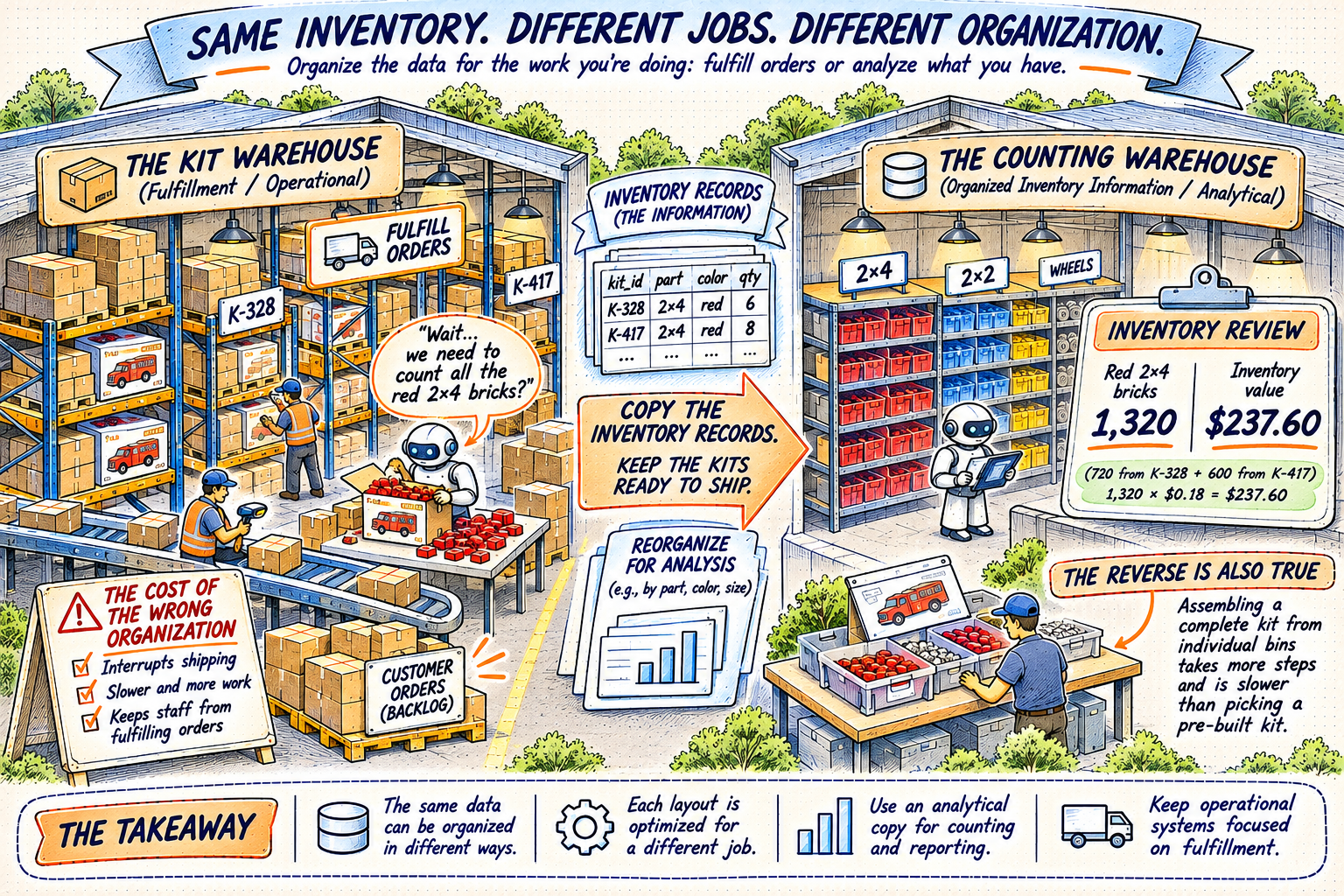
The counting warehouse represents copied inventory records. Physical bins are shorthand: Parquet groups values by field, and the query still filters and calculates.
Now try to sell the fire station
The bins look like the obvious winner until a customer wants a complete kit.
Now someone needs the red bricks, the grey plates, the windows, the wheels and every other piece on the parts list. They have to visit the bins, gather the right quantities and pack the box. The kit warehouse had that order ready to leave.
That cost is the other half of the comparison. An application frequently needs the pieces of one record together, and it needs to change individual records as people work. A columnar layout puts more emphasis on reading selected fields across many records. Parquet files are well suited to that broad reading; the constant small updates behind an ordering application call for a database designed to handle them.
You could count bricks by opening kits. You could sell kits by collecting loose pieces. Both warehouses can get there. Each makes one of those jobs much harder than it needs to be.
The question is what you're asking the warehouse to do all day.
Give the counting crew their own space
Most businesses need both jobs. Orders have to leave the building, and finance still needs to know what's in it.
In the kit warehouse, the trouble starts when the inventory crew and the shipping crew are the same people. Every hour spent opening boxes is an hour they can't spend getting orders out the door.
I've watched queries do that to an application: eat the CPU it depended on, slow every page for every user and occasionally take the app down. Monthly reporting is a familiar trigger. Someone aggregates the previous month's activity against the same database customers are using that morning.
The report can be correct and still make everyone else's morning worse.
So keep the kits ready for customers and give the counting operation a place of its own. With data, we can copy the information instead of taking the stock off the shelves. A pipeline collects records from the application, reshapes them for analysis and puts them somewhere the analytical work can run separately, often in Parquet files.
Organizing the bins reduces the work of counting. Giving the counters their own crew and workspace keeps that work from holding up shipping. Those are two different improvements. A Parquet copy queried on the application's already-busy machine can still compete for its resources. A separate analytical machine can take that pressure away even before the layout is improved.
There is still a delivery to organize. Collecting the copy uses source resources, and someone has to maintain the pipeline and reconcile changes. The counting warehouse only knows about changes that have reached it. A kit shipped ten minutes ago might still appear in the last export. The choice of when to restock, when to check the shipping floor and when to keep a continuous feed is the question in Data on Demand or Always On.
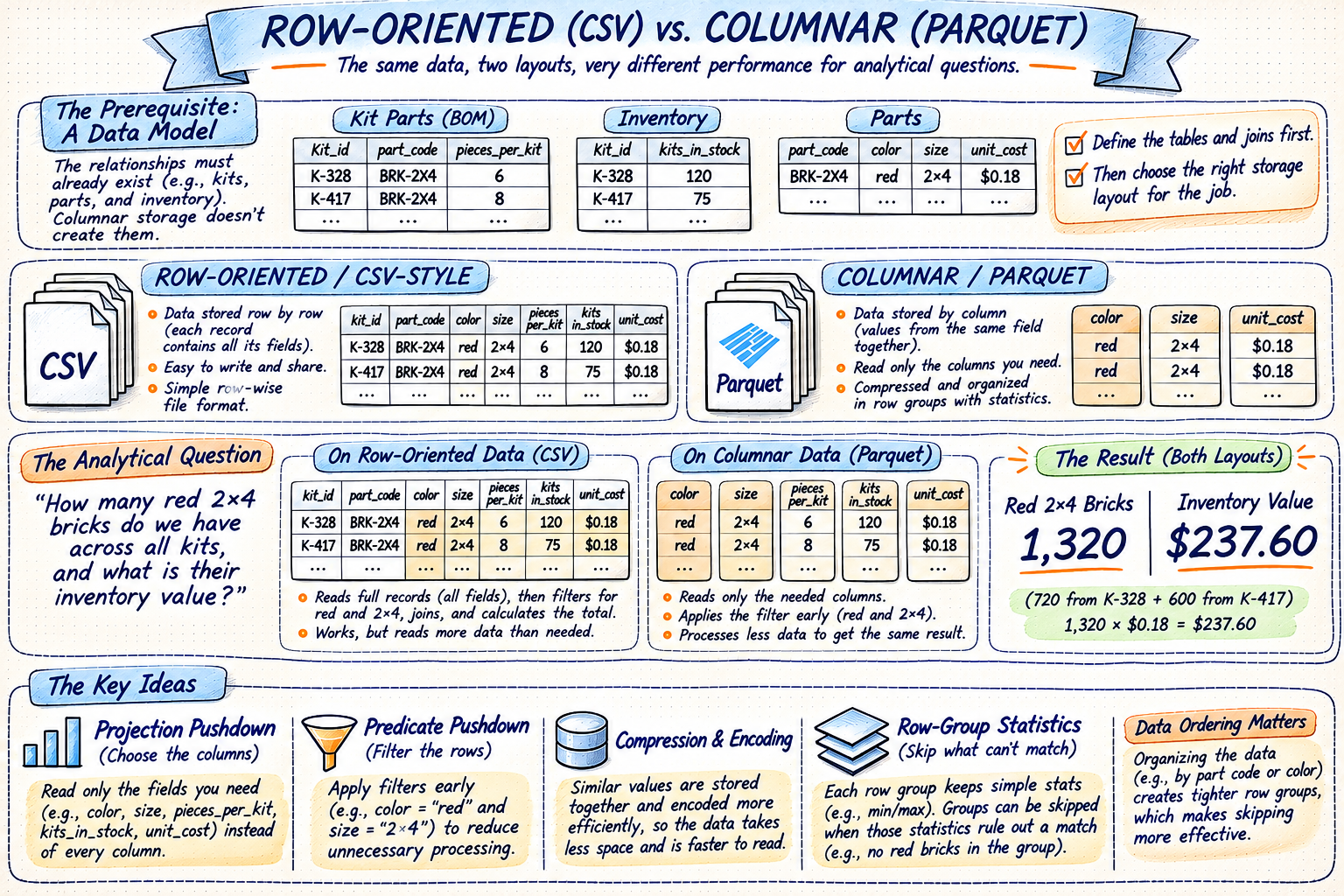
The row-scan example uses CSV. An indexed database has other options. The quantities and costs shown are illustrative; both layouts calculate the same answer.
Then give an agent the clipboard
Now finance hands the clipboard to an agent that can work through the follow-up questions too.
Which pieces account for most of that value? Show only the bricks that arrived in June. Compare those with May. Break the difference down by kit. Check the result again.
That is useful work. It can also mean a lot of trips through the warehouse. Point the agent at the boxed kits, and its follow-up questions can keep the shipping crew opening boxes all afternoon. The monthly-reporting problem becomes something that can happen whenever someone gets curious.
Give it the counting warehouse, and those attempts happen where the pieces are arranged for the questions. It can read the relevant fields and try another calculation while the application carries on serving customers. That warehouse might be a shared analytical system or a copy on your laptop, as in Give the Agent a Working Environment.
Sometimes it really does need to visit the shipping floor: the order that just left, or the address corrected this morning. Give it the order number and a focused lookup. A visitor's badge determines which stock it can inspect. A read-only badge lets it look without moving anything.
That badge doesn't say how long it can occupy the aisle or how many visitors can arrive together. Query timeouts, concurrency controls and workload budgets where supported set those boundaries. Permission to access the records and permission to consume the shift are separate decisions. Read-only alone still allows an expensive count.
Before handing over the clipboard, decide which job you're giving it. Shipping an order? Find the kit. Working out where the money is tied up in stock? Send it to the bins, with room to do the counting.